
Install BeReach Plugin
Install the BeReach plugin in OpenClaw and connect your API key in 3 copy-paste steps.
Install or update the BeReach plugin by copying and pasting these prompts directly into your OpenClaw chat.
Step 1 — Remove old plugin (if any)
If you already have BeReach installed and want a clean reinstall, send this to your assistant:
Can you please delete the bereach plugin and all files associated to the bereach plugin.
Also, please remove all bereach section from the core files (soul, memory, tools, agents, etc)
Fresh install?
If this is your first time installing BeReach, skip this step and go directly to Step 2.
Step 2 — Install the plugin
Send this to your assistant:
Run this shell command:
openclaw plugins install bereach-openclaw
openclaw gateway restart
Wait for the installation to complete and the gateway to restart.
Step 3 — Connect your API key
Send this to your assistant (replace brc_xxx with your actual key):
can you use my api key for bereach plugin now: brc_xxx
Don't have a BeReach API key?
- Install the Chrome extension: Download the extension
- Get your token here: Get your token
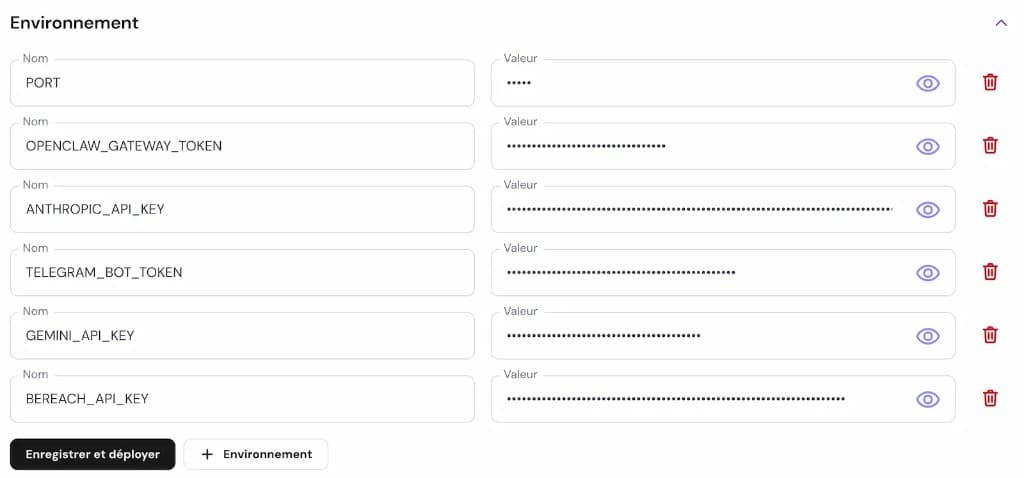
You can also add your BEREACH_API_KEY directly in the Hostinger environment variables:
Step 4 — Verify it works
Send this in a new prompt to check everything is connected:
what can you learn from my linkedin profile ?
If BeReach is properly installed, your assistant will fetch and display your LinkedIn profile data. You're all set.