
Set Up Claude Code for OpenClaw
Connect your Claude Pro subscription to OpenClaw using Claude Code. Step-by-step for Mac and Windows.
OpenClaw uses Claude as its AI engine. To make your assistant work, you need to connect your Claude Pro subscription using Claude Code.
Do NOT use the Anthropic API
OpenClaw does not use the classic Anthropic API from platform.claude.com. That's pay-per-token and costs a lot more than a Claude subscription.
Step 1 — Subscribe to Claude Pro
Go to claude.ai/pricing and subscribe to Claude Pro ($20/month) or Claude Max ($100-200/month).
Once your subscription is active, you can install Claude Code to get your API key.
Step 2 — Install Claude Code
Claude Code is the official tool that lets OpenClaw use your Claude subscription.
On Mac — open a terminal and run:
curl -fsSL https://claude.ai/install.sh | bashDon't know how to open a terminal?
Open Spotlight (Cmd+Space), type "Terminal", and press Enter.
On Windows — open a terminal and run:
curl -fsSL https://claude.ai/install.cmd -o install.cmd && install.cmd && del install.cmdStep 3 — Generate your token
In your terminal, run:
claude setup-tokenClaude will open a login page in your browser.
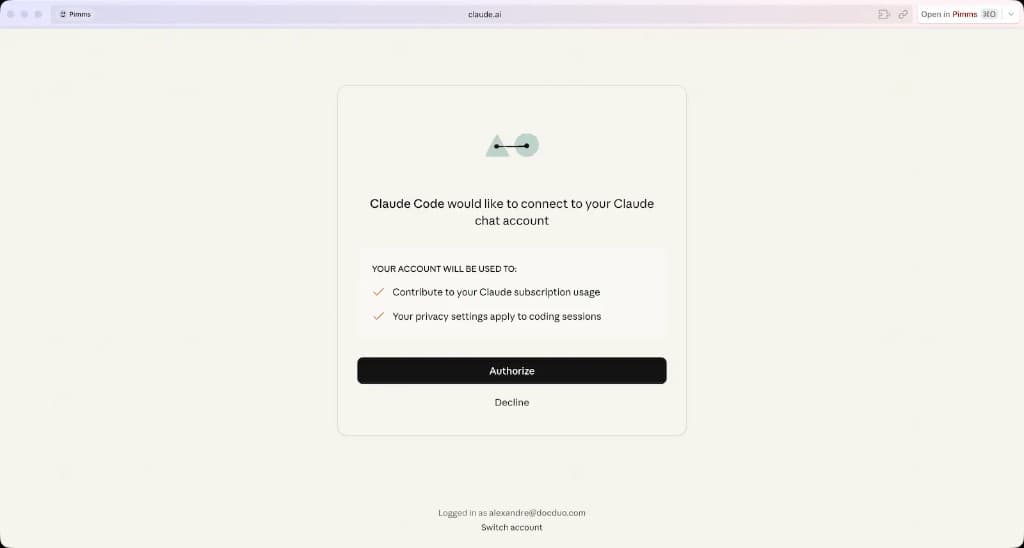
Log in with your Claude account and accept. Claude Code will generate an access token linked to your subscription. It looks like this:
sk-ant-xxxxxxxxxxxxxxxx
Copy this token — you'll paste it into your OpenClaw configuration as ANTHROPIC_API_KEY.
Common mistakes
Never create an API key on platform.claude.com
The Anthropic developer console (platform.claude.com) is for developers building apps with the API. It charges per token and is much more expensive than using your Claude Pro subscription through Claude Code.
Disable Extra Usage immediately
In your Claude account settings, find the option "Turn on extra usage to keep using Claude if you hit a limit" and make sure it is unchecked. If you leave it on, you may get surprise charges when you exceed your plan limits.
If you need more capacity, upgrade to Claude Max instead.
Need more capacity?
If you're hitting credit limits regularly, check our guide on optimizing your Claude Pro subscription to learn how to use Sonnet and Haiku strategically.